Record meetings. Get the words as text.
An audio transcriber for iPhone and iPad. Tap record, lock your phone if you like, and MeetNuvio turns the meeting into a timed transcript, all on your device.
Coming soon to the App Store
How it works
- Tap record. Put your iPhone or iPad on the table and start. Pause when you need to; phone calls pause it and it carries on afterwards.
- Lock the screen if you like. MeetNuvio keeps recording. The Lock Screen and the Dynamic Island show that it's recording and for how long, with Pause and Stop buttons.
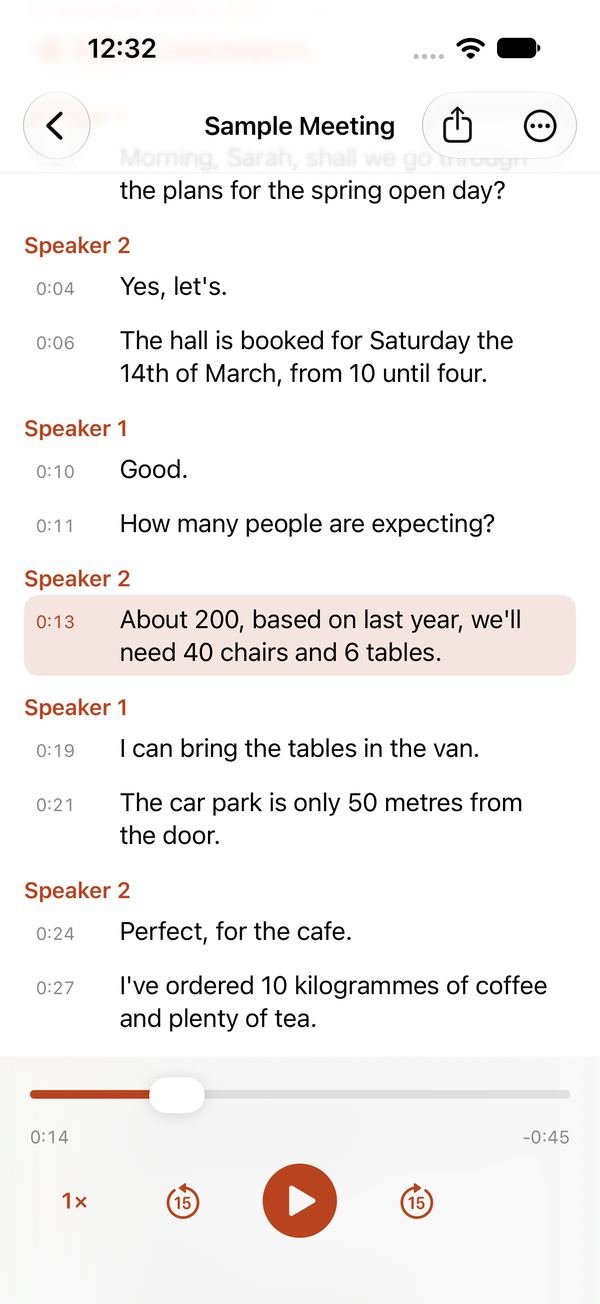
- Get the transcript. Apple's speech recognition writes it out on your device, line by line, each with its time. If your language's model is already downloaded, you see the words appear while you record.
- Read, tidy and share. Play it back with the current line highlighted, fix words, name the speakers, then copy the text or export it.
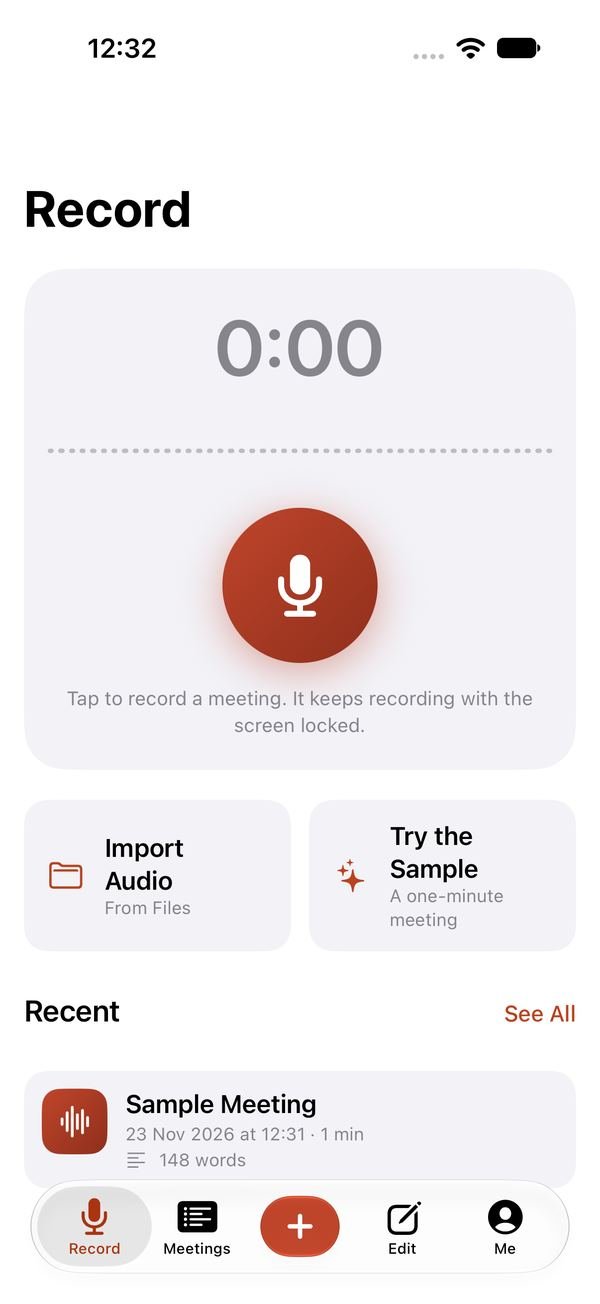
One button to record. Import audio you already have, or try the one-minute sample. 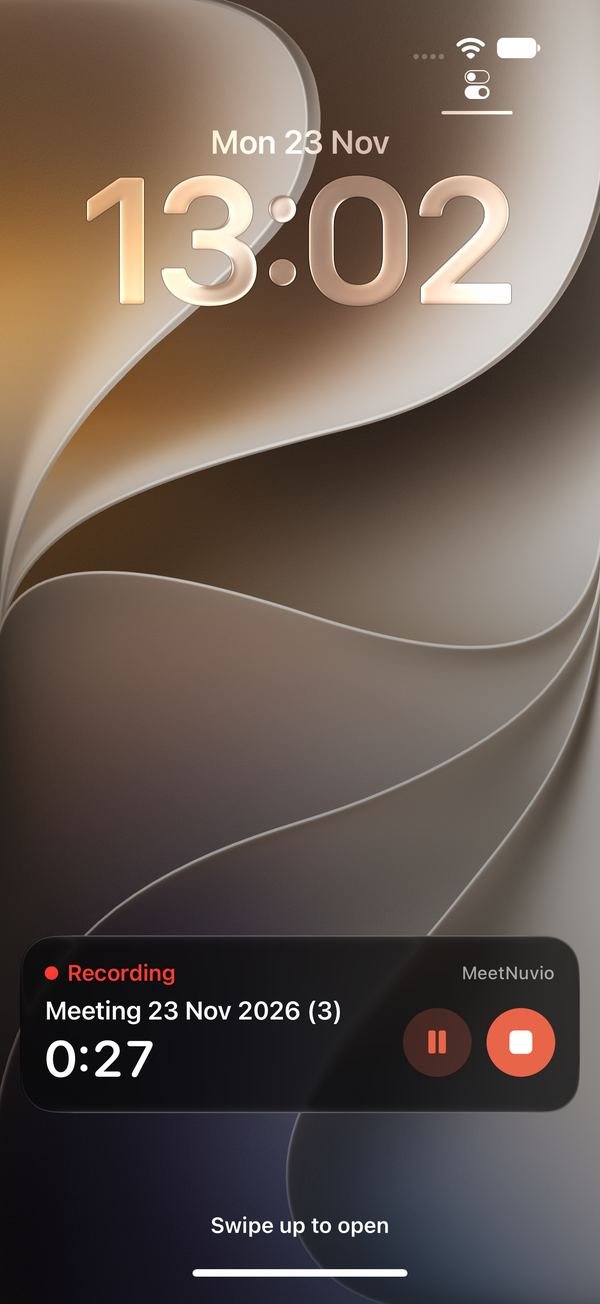
Recording with the screen locked, with Pause and Stop on the Lock Screen.
Features
Records with the screen locked
A Live Activity on the Lock Screen and in the Dynamic Island shows the time, with Pause, Resume and Stop.
Transcribed on the device
Apple's on-device speech recognition. No servers, and it works offline once the language is downloaded.
Follow along
Playback highlights the line being said. Tap any line to play from there, at up to 2× speed.
Search every meeting
Find a meeting by any word said in it, not just by its title.
Edit and name speakers
Correct lines, delete them, set who said what, and turn "Speaker 1" into a name.
Export
Copy the text, or share it as plain text (.txt), subtitles (.srt, .vtt) or Markdown (.md). Share the audio too.
Import audio
Transcribe recordings you already have: m4a, mp3, wav, caf, aiff, and the sound from mp4 and mov.
iPhone and iPad
Made for both, with no account. Purchases belong to your Apple Account: Restore Purchases brings them to another device.
Pricing
Free to download, and your first 2 recordings are free. After that, choose a subscription or a one-time purchase in the app for unlimited recordings.
The App Store shows the prices in your currency before you buy. Payment is charged to your Apple Account. A subscription renews automatically unless cancelled at least 24 hours before the end of the current period; manage or cancel it in Settings › your name › Subscriptions. The one-time purchase never renews. Already bought it? Tap Restore Purchases in the app. Use of the app is covered by Apple's standard Terms of Use (EULA).
Private by design. Recording and transcription both happen on your iPhone or iPad. No servers, no account, no analytics, no ads, no tracking: your audio and transcripts never leave your device unless you share them. Privacy Policy
Questions
Are my recordings uploaded anywhere?
No. Recording and transcription both happen on your iPhone or iPad, with Apple's on-device speech recognition. There's no account and MeetNuvio collects no data. Your audio and transcripts leave the device only if you share them.
Does it keep recording with the screen locked?
Yes. Lock your iPhone and MeetNuvio carries on recording. The Lock Screen and the Dynamic Island show the time, with Pause and Stop buttons. (iPad has no Live Activities, but it records with the screen locked too.)
Does it work without an internet connection?
Yes, once your language's speech model is on the device. The first time you transcribe in a language, iOS downloads Apple's model for it; that download contains none of your audio. After that, transcription works offline.
Can it tell who is speaking?
Not by itself: Apple's speech recognition doesn't separate speakers. In Edit you can set each line's speaker and give speakers names, such as Speaker 1 to Sarah.
Which languages does it understand?
The languages Apple's speech recognition offers on your device; Me › Language lists them and shows which are downloaded. "Automatic" uses your device's language. For a meeting in another language, change its language and it's transcribed again.
Can I transcribe a recording I already have?
Yes. Import Audio takes m4a, mp3, wav, caf and aiff files, and the sound from mp4 and mov videos, from the Files app. A voice memo can be saved to Files from Voice Memos' share button first.
Is it free?
It's free to download and your first 2 recordings are free. After that, choose a subscription or a one-time purchase in the app.
Anything else: see Support.